Backup and Recovery
What is Backup and Recovery?
Imagine your database crashes due to a power failure. Without a backup, everything is gone. A backup is a copy of your database — data files, control files, logs — that lets you restore the system when something goes wrong.
Recovery is the process of using that backup to bring the database back to its last consistent state.
Types of Data to Back Up
- Business Data — includes personal information of clients, employees, contractors etc. along with details about places, things, events and rules related to the business.
- System Data — includes specific environment/configuration of the system used for specialised development purposes log files, software dependency data, disk images.
- Media Files — files like photographs, videos, sounds, graphics etc. need backing up. Media files are typically much larger in size.
Backup Strategies
Full Backup
A full backup copies everything — tables, indexes, views, procedures. Think of it as a complete snapshot of the database at a point in time. It must be done at least once before any other strategy can be used.
| ✓ Advantages | ✗ Disadvantages |
|---|---|
| Simple — recovery needs just one backup set | Slowest to perform |
| No dependency between backups | Longest system downtime |
| Loss of one backup doesn’t affect others | Uses the most storage |
Incremental Backup
Instead of copying everything, an incremental backup only copies what has changed since the last backup (full or incremental).
| ✓ Advantages | ✗ Disadvantages |
|---|---|
| Smallest backup size | Recovery needs full + every incremental in sequence |
| Minimal downtime | Missing even one incremental breaks recovery |
| Most cost-efficient | Most complex to manage |
Differential Backup
A differential backup copies everything that has changed since the last full backup — regardless of any incrementals in between. Recovery only ever needs two things: the last full backup and the most recent differential.
The longer you wait between differentials, the larger they grow — eventually approaching full backup size.
| ✓ Advantages | ✗ Disadvantages |
|---|---|
| Fewer backup sets needed for recovery | Larger than incremental backups |
| Great when full backups are infrequent | Grows over time if not managed |
Comparing the Three
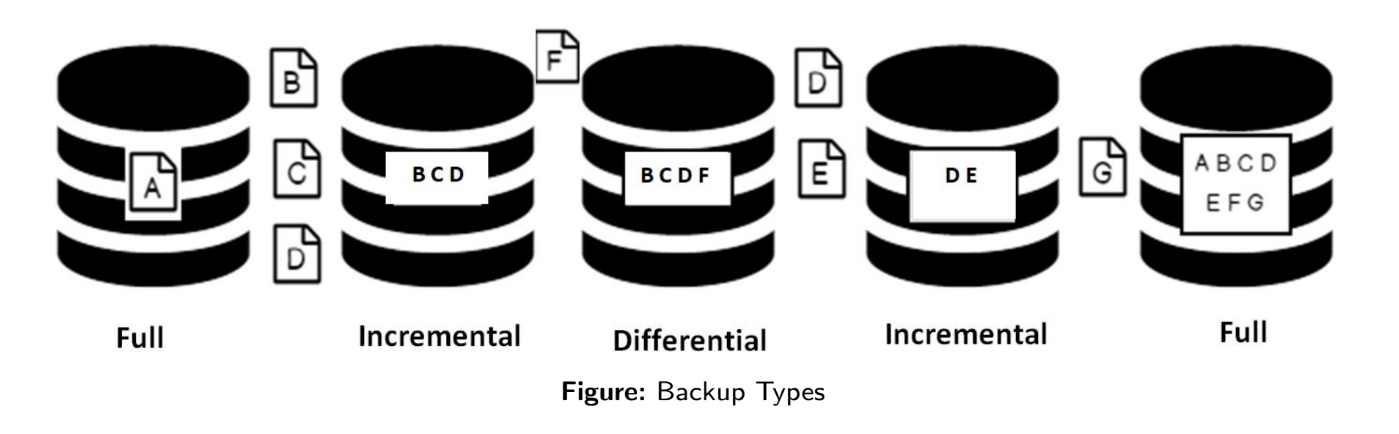
| Full | Incremental | Differential | |
|---|---|---|---|
| What it copies | Everything | Changes since last backup | Changes since last full |
| Backup size | Largest | Smallest | Medium (grows over time) |
| Recovery sets needed | 1 | Full + all incrementals | Full + latest differential |
| Recovery complexity | Simplest | Most complex | Moderate |
A smart schedule: full backup monthly + differential weekly + incremental daily.
Hot Backup
All the strategies above are cold backups — the database pauses during the backup. But some systems can never go offline: financial trading platforms, real-time sensor systems, satellite feeds.
Hot backup keeps the database fully live while the backup runs concurrently.
| ✓ Advantages | ✗ Disadvantages |
|---|---|
| Database stays available to users | Not feasible for very large, monolithic datasets |
| Point-in-time recovery is easier | Any error mid-backup can terminate the entire process |
| Efficient for dynamic, modular data | High setup and maintenance cost |
In practice: hot backup is used for transaction log backups. Data backups (incremental/differential) are done cold. A transaction log records every database modification in sequence. Even if a data backup is slightly inconsistent (taken while the database was live), replaying the transaction log on top of it restores full consistency.