Indexing
What is an Index?
Think of a database index like the index at the back of a textbook — instead of reading every page, you look up the term, get the page number, and jump straight there.
An index is a smaller, separate data structure that maps search-key values to their records in the main table. Each entry in an index file is called an index entry and looks like this:
| search-key | pointer |
|---|---|
| “Pabitra Mitra” | → record #6 |
There are two broad families:
- Ordered indices — entries are sorted on the search key.
- Hash indices — entries are scattered into buckets using a hash function. Fast for exact lookups, but can’t handle range queries.
This section focuses on ordered indices.
Ordered Indices: Primary vs. Secondary
Primary index (clustering index): The index whose search key matches the physical order of the data file. Efficient for sequential scans since adjacent records on disk are also logically adjacent.
Secondary index (non-clustering index): An index on a different attribute than the one the file is sorted on. Pointers are scattered across the disk, so sequential scans are expensive.
⚠️ A table can have only one primary index but many secondary indices.
An index-sequential file is a sequentially ordered file paired with its primary index, also called ISAM (Indexed Sequential Access Method).
Dense vs. Sparse Indexes
Dense Index
One index entry for every record in the data file.
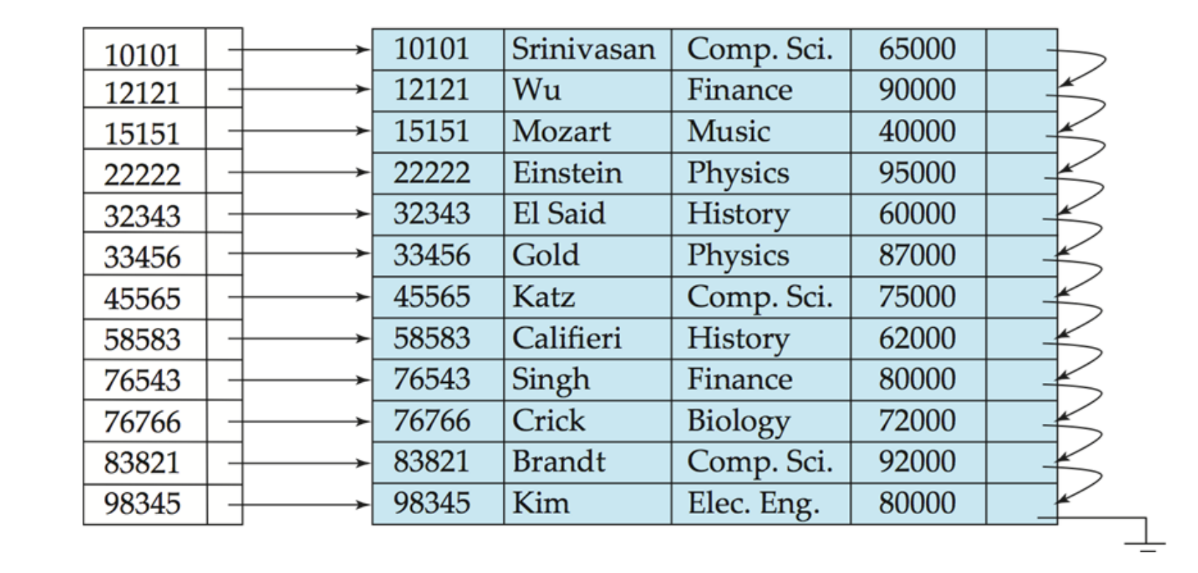
Advantage: Can check record existence from the index alone.
Disadvantage: Index grows proportionally with the data.
Sparse Index
One index entry per disk block (not per record).
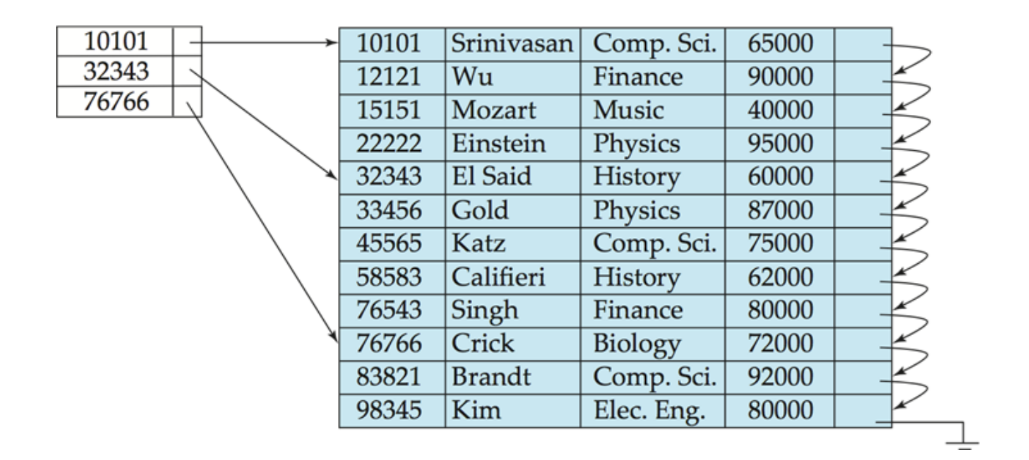
To find key \(K\): find the largest index entry \(≤ K\), follow its pointer to the block, then scan within the block.
Advantage: Much smaller index, less maintenance.
Disadvantage: Slightly slower — requires a sequential scan within the block.
💡 One sparse index entry per disk block is the standard trade-off — small enough for memory, granular enough to avoid long scans.
Secondary indices must be dense because records with a given secondary key are scattered across the file — a sparse index would miss records not sitting at a block boundary.
Multilevel Index
Problem: If the primary index itself is too large to fit in memory, searching it becomes expensive.
Solution: Build a sparse index on top of the primary index.
- Inner index — the primary index file (on disk).
- Outer index — a sparse index of the inner index (fits in memory).
Lookup path: outer index (memory) → inner index block → data record.
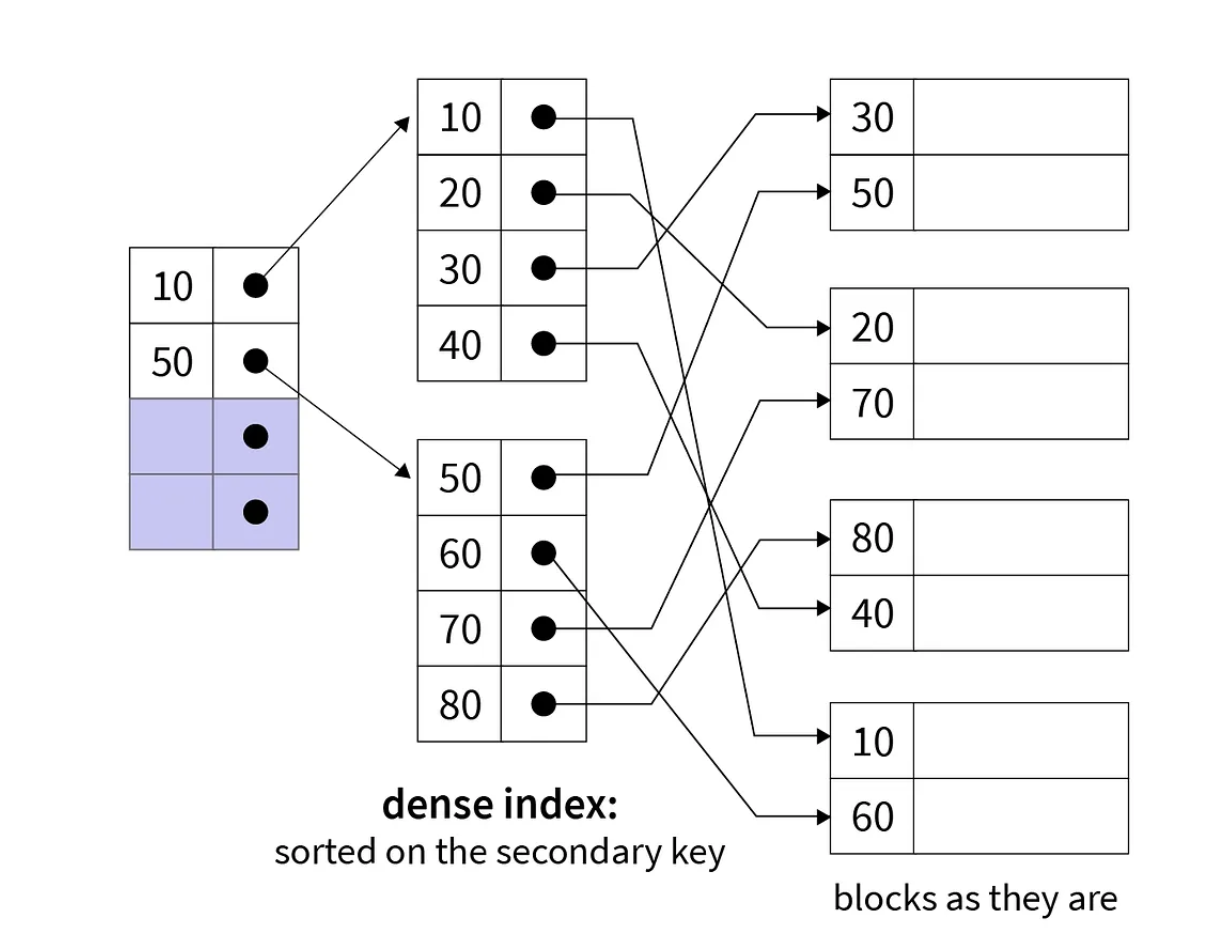
If even the outer index is too large, add another level. This layering idea is the foundation of B-trees.
Index Updates
On Deletion
- If the deleted record was the only one with that key value, remove the index entry.
- Dense: treat like a sorted-list deletion.
- Sparse: replace the entry with the next key in the block; if the next key already has its own entry, just delete the current one.
On Insertion
- Dense: if the key is absent from the index, insert a new entry in sorted order.
- Sparse: no change needed unless a new disk block is created — if so, add an entry for the first key in that new block.
Multilevel updates follow the same logic, applied at each level recursively.
Index Definition in SQL
-- Create a basic index
CREATE INDEX emp_ename ON emp_tab(ename);

-- Create a unique index (enforces candidate key constraint)
CREATE UNIQUE INDEX emp_email ON emp_tab(email);

-- Create a composite index on two columns
CREATE INDEX emp_comp ON emp_tab(ename, empno) COMPUTE STATISTICS;

-- Function-based index (precomputes the function result for each row)
CREATE INDEX emp_upper ON emp_tab(UPPER(ename)) COMPUTE STATISTICS;

-- Bitmap index (best for columns with few distinct values)
CREATE BITMAP INDEX idx_gender ON student(gender);

-- Drop an index
DROP INDEX emp_ename;
💡
COMPUTE STATISTICStells the optimizer to gather column statistics at index creation time — important for the optimizer to make good decisions.
📌
CREATE UNIQUE INDEXis technically redundant if you’ve already declared the column asUNIQUEin the table definition — the constraint is preferred.
Guidelines for Indexing
Indexing is an ongoing task — query patterns change, tables grow, and indexes need to be monitored and adjusted over time.
- Rule 1: Index the Correct Tables
- Rule 2: Index the Correct Columns
- Rule 3: Limit the Number of Indexes for Each Table
- Rule 4: Choose the Order of Columns in Composite Indexes
- Rule 5: Gather Statistics to Make Index Usage More Accurate
- Rule 6: Drop Indexes That Are No Longer Required
Formulas for Solving the Problem
\[\text{Space of Index} = \text{Size of Key Field} + \text{Size of Pointer Field}\]
\[\text{Total Index Space} = \text{Space of Index} \times \text{No. of Records}\]
\[\text{One Block Size} = \frac{\text{Size of File}}{\text{No. of Blocks Used to Store the File}}\]
\[\text{No. of Blocks for Index} = \left\lceil \frac{\text{Total Index Space}}{\text{One Block Size}} \right\rceil\]
💡 Always round up — a partial block still occupies a full block on disk.