Relational Algebra and Calculus
Introduction to Query Languages
Query languages in DBMS are broadly classified into two categories:
- Procedural Query Languages: The user specifies what data is needed and how to get it. Relational Algebra is a procedural language.
- Non-Procedural (Declarative) Query Languages: The user specifies what data is needed without specifying how to get it. Relational Calculus is a non-procedural language.
Relational Algebra (RA)
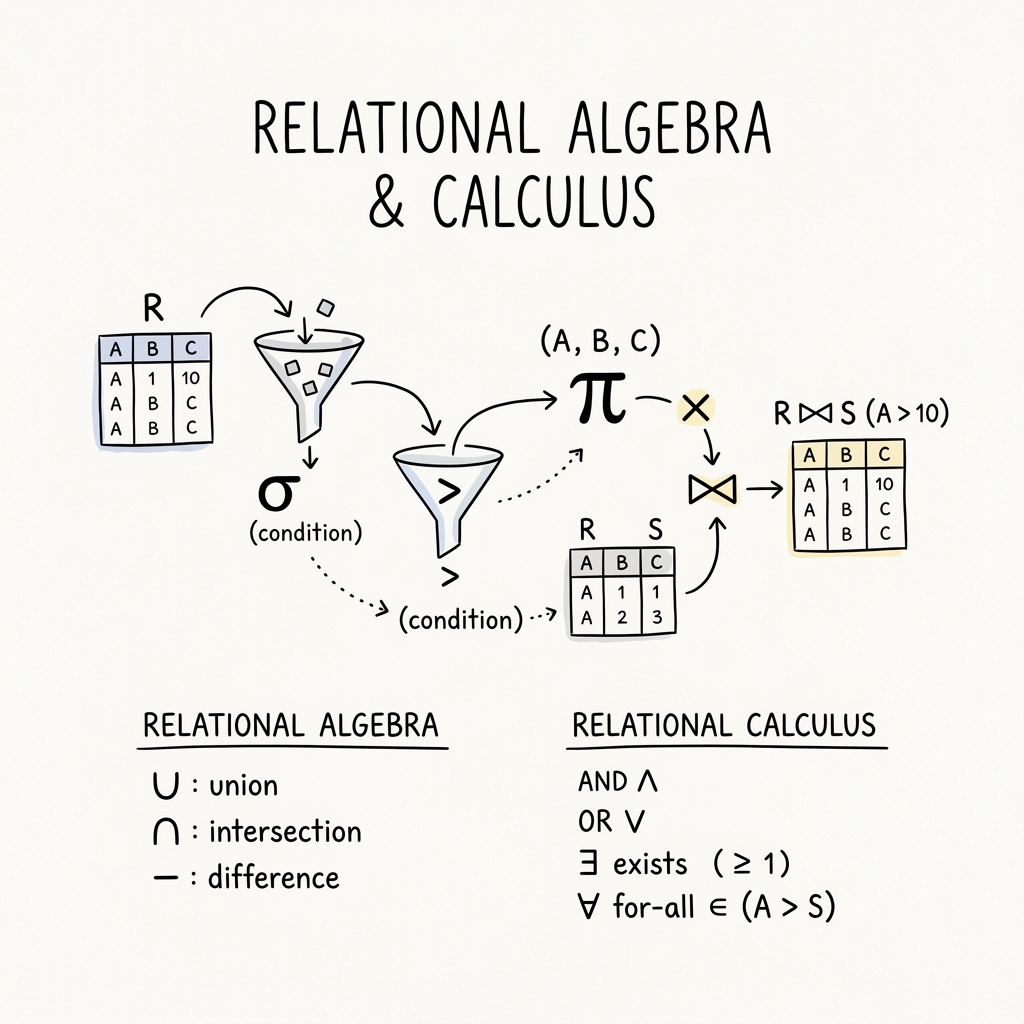
Relational Algebra is a procedural query language that takes one or two relations as input and produces a new relation as a result. The fundamental operations include:
- \(\sigma\) - Select: Filters rows based on a given condition.
- \(\pi\) - Project: Selects specific columns from a relation.
- \(\neg\) - Negation (Not)
- \(\cup\) - Union: Combines rows of two relations.
- \(\cap\) - Intersection: Finds common rows between two relations.
- \(\times\) - Cartesian Product: Combines each row of the first relation with each row of the second.
- \(-\) - Set Difference (Except): Finds rows present in the first relation but not in the second.
- \(⋈\) - Natural Join: Combines two relations based on matching values in common attributes.
Examples
1. Find all the names of students whose age is greater than 25, or who are enrolled in Maths
Schema: - Students(RollNo, Name, Age, Subject)
First, we filter the Students table using the Selection (\(\sigma\)) operation for the condition Age > 25 OR Subject = 'Maths'. Then, we use the Projection (\(\pi\)) operation to only retrieve the Name attribute.
\[ \pi_{Name}(\sigma_{Age>25 \space \lor \space Subject='Maths'}(Students)) \]
2. Find the name and sports of the student whose age is less than 25 and awards is greater than 3
Schema: - Students(RollNo, Name, Age) - Activity(RollNo, Sports, Awards)
Here we need data from two different domains (the Students and Activity tables). We use a Natural Join (\(⋈\)) to combine them on their common attribute (RollNo), filter the result, and project the specific columns.
\[ \pi_{Name, Sports}(\sigma_{Age<25 \space \land \space Awards>3}(Students ⋈ Activity)) \]
Division Operation
The Division (\(r \div s\)) operation is used in queries that involve the word “every” or “all”. For example, “Find students who have taken all courses offered in the Biology department.”
Suppose we have two relations: \(r(A, B, C)\) and \(s(B, C)\). The result of \(r \div s\) will be a relation with the attribute \(A\), containing values of \(A\) that match with all the tuples present in \(s\).
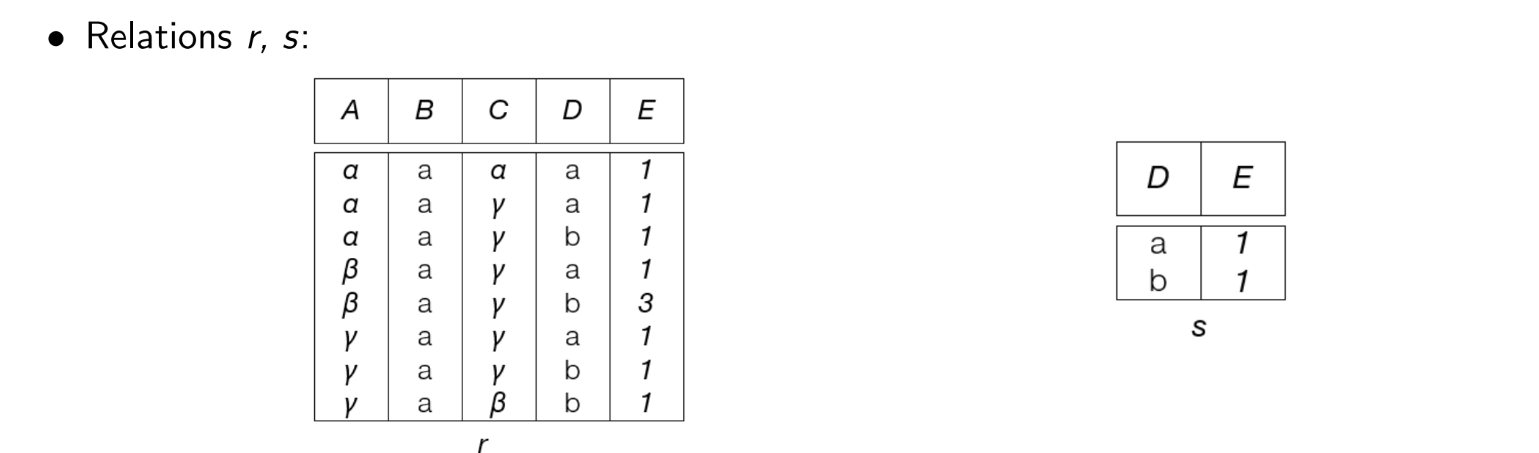
In the mathematical example from the notes, if we perform \(r \div s\):
| A | B | C |
|---|---|---|
| \(\alpha\) | a | \(\gamma\) |
| \(\gamma\) | a | \(\gamma\) |
The output would be the values in column A (\(\alpha\) and \(\gamma\)) that are associated with all tuples of the divisor.
Tuple Relational Calculus (TRC)
Tuple Relational Calculus is a non-procedural query language. Instead of writing operations to fetch data, we write mathematical predicates that define the resulting tuples.
A basic TRC query is of the form:
\[ \{t \space | \space P(t)\} \]
Where: - \(t\) = The resulting tuple(s) - \(P(t)\) = The predicate (a condition that evaluates to true or false for tuple \(t\))
TRC Examples
1. Find the name of the students whose age is 21
\[ \{t \space | \space \exists \space s \in students (t.name=s.name \land s.age=21) \} \]
Intuition: We are looking for a tuple \(t\) such that there exists (\(\exists\)) a tuple \(s\) in the students relation where the name in our result matches the name in the student record, and the student’s age is 21.
2. Find the name of the employees who work in the ‘Manufacturing’ department
Schema: - employee(id, name, salary) - department(id, d_id, name, building)
\[ \{M \space | \space \exists \space E \in employee \space \exists \space D \in department ( E.id=D.id \land D.name='Manufacturing' \land M.name=E.name) \} \]
Intuition: We want a tuple \(M\) such that there exists an employee \(E\) and a department \(D\) where their IDs match, the department name is ‘Manufacturing’, and our result tuple \(M\) takes the name of that employee \(E\).
Domain Relational Calculus (DRC)
Domain Relational Calculus is another non-procedural query language, equivalent in expressive power to Tuple Relational Calculus. However, instead of using whole tuples as variables, DRC uses variables that take values from domains (individual attributes/columns).
A basic DRC query is of the form:
\[ \{ <x_1, x_2, ... ,x_n> \space | \space P(x_1, x_2, ... , x_n)\} \]
Where: - \(<x_1, x_2, ... , x_n>\) represents domain variables (e.g., individual columns like name, age, etc.) - \(P\) represents a predicate formula similar to TRC.
DRC Examples
1. Find the name of the students whose age is 21
Schema: - student(name, age, marks)
\[ \{<a> | \space \exists \space b \space (<a,b,c> \in students \space \land \space b=21) \} \]
Intuition: We want to output a single domain variable \(a\) (which represents the name), such that there exists some marks variable \(c\) where the tuple \(<a, b, c>\) exists in the students relation, and the age variable \(b = 21\).
2. Find the name of the employees who work in the ‘Manufacturing’ department
Schema: - employee(id, name, salary) - department(id, d_id, name, building)
\[ \{ <b> |\space \exists \space a,c \space (<a, b, c> \in employee) \space \land \space \exists \space x,y,z \space (<a, x, y, z> \in department \space \land y='Manufacturing') \} \]
(Note: The notes had a slight variable mismatch. I corrected it here to ensure variable \(a\) maps to id, \(b\) maps to name, \(c\) maps to salary, and in the department relation, the first variable \(a\) corresponds to id, ensuring the join condition.)
Intuition: We want to output variable \(b\) (employee name). To do this, we assert that the tuple \(<a, b, c>\) must exist in employee. Additionally, we assert that the tuple \(<a, x, y, z>\) must exist in department where the variable \(y\) (department name) is exactly ‘Manufacturing’. The shared variable \(a\) (the ID) effectively joins the two relations.