Log-Based Recovery
How Data Moves: The Access Model
Data lives on disk (physical blocks) and is loaded into memory (buffer blocks) when needed.
input(B)— load block B from disk into memory buffer.output(B)— flush buffer block B back to disk.
Inside a transaction:
read(X)— copy data item X from buffer into the transaction’s local variable.write(X)— copy the local variable back into the buffer block.
Log-Based Recovery
The key idea: before touching the database, every change is first recorded in a log on stable storage. If a crash happens, the log tells us exactly what to undo or redo. A log is kept on stable storage. The log is a sequence of log records, which maintains information about update activities on the database.
Log record types:
| Record | Written when |
|---|---|
< Ti start > |
Transaction begins |
< Ti, X, V1, V2 > |
Before writing X — V1 is the old value, V2 is the new value |
< Ti commit > |
Transaction completes successfully |
< Ti abort > |
Transaction is rolled back |
A transaction is considered committed the moment its commit log record reaches stable storage — even if the actual data changes are still sitting in the buffer.
Database Modification Schemes
| Scheme | When updates hit disk |
|---|---|
| Immediate modification | Anytime — before or after commit |
| Deferred modification | Only at commit time |
We focus on immediate modification — it requires both undo and redo during recovery, but it is the more commonly used approach.
Example
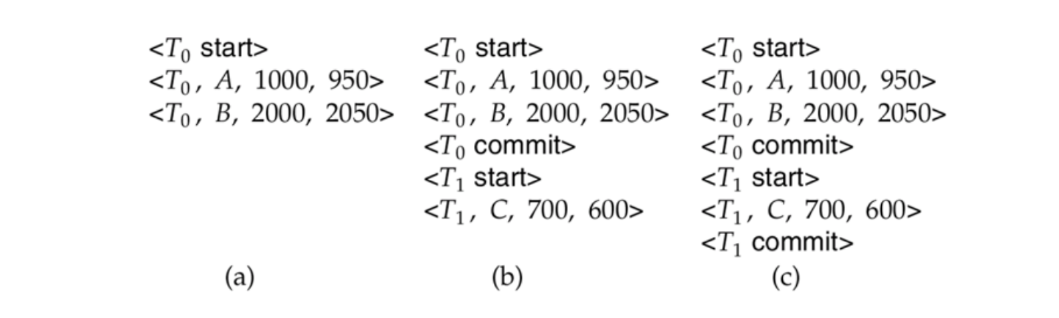
| Scenario | Log state at crash | Recovery action |
|---|---|---|
| (a) | T0 started but neither committed nor aborted | Undo T0 — restore B to 2000, then A to 1000 |
| (b) | T0 committed; T1 started but not committed | Redo T0 (set A=950, B=2050); Undo T1 (restore C to 700) |
| (c) | Both T0 and T1 committed | Redo T0 then Redo T1 (set A=950, B=2050, C=600) |
Undo and Redo
When a crash happens, the recovery system needs to either reverse incomplete work or replay committed work that didn’t make it to disk.
| Operation | What it does | Direction | When used |
|---|---|---|---|
undo(Ti) |
Restores all writes to old values (V1) | Scans log backwards | Ti started but never committed |
redo(Ti) |
Reapplies all writes to new values (V2) | Scans log forwards | Ti committed but data may not be on disk |
During undo, each restored value is recorded as a Compensation Log Record (CLR): < Ti, X, V1 >. When the undo is complete, < Ti abort > is written.
Deciding What to Do After a Crash
| Log contains | Action |
|---|---|
< Ti start > but no commit or abort |
Undo Ti |
< Ti start > and < Ti commit > or < Ti abort > |
Redo Ti |
Checkpoints
Without checkpoints, recovery would replay the entire log from the very beginning — extremely slow for a database that has been running for a long time. A checkpoint flushes all buffered writes to disk and records which transactions are currently active. Recovery only needs to look at the log from the checkpoint onwards.
Steps during checkpointing:
- Output all in-memory log records to stable storage.
- Flush all modified buffer blocks to disk.
- Write a
< checkpoint L >record, where L is the list of active transactions.
After a crash, for each transaction relative to the last checkpoint:
| Transaction state | Action |
|---|---|
| Committed before checkpoint | Ignore — already safely on disk |
| Committed after checkpoint | Redo |
| Still active at time of crash | Undo |